
Skip to content
| User Manuals
| User Manuals

en_US English
en_US English ar Arabic fr_FR French

| User Manuals
| User Manuals

Administrator

  • Notification
  • New Landing Page
  • Auto-Enrollment
  • AI X-Sera
  • Edit Profile
  • Logging in
  • Homepage
  • Personal Bar
  • Users Management
  • Corporates
  • Trainers
  • Trainees
  • Styles and Academy Settings
  • Managing Categories
  • Courses Settings
  • Courses
  • Managing Content
  • Managing Sessions
  • Managing Assignments/Surveys
  • Creating/Adding Exam Questions
  • Comprehensive Progress Report
  • Competencies
  • Questions Bank
  • Certificate Templates
  • Learning Path
  • Specializations
  • Coupons
  • Packages
  • Announcements
  • Placement Exam
  • Course Statistics
  • Workflow
  • Setting up Workflows: Utilities
  • Enrollment Report
  • Technical Support

Trainees

  • Logging in
  • Home Page
  • Personal Profile
  • Edit Profile
  • Update Personal Information
  • My Learning
  • Announcements
  • Mailbox
  • Courses Settings
  • Course Content
  • Virtual Classrooms
  • Joining The classroom
  • Classroom Conversation
  • Exams and Assignments
  • Certificates

Trainer

  • LOGGING IN
  • HOME PAGE
  • PERSONAL PROFILE
  • EDIT PROFILE
  • UPDATE PERSONAL INFORMATION
  • MAILBOX
  • Create Course
  • COURSE CONTENT
  • ONLINE SESSION
  • ADDING ONLINE SESSION USING ZOOM MEETING
  • ADDING ONLINE SESSION USING MS TEAMS
  • STARTING THE SESSION
  • JOINING THE SESSION
  • ZOOM CLASSROOM MAIN SCREEN
  • EXAMS
  • Create ASSIGNMENT
  • ASSIGNMENT Settings
  • Advanced OPTIONS
  • Advanced SETTING
  • MANAGING EXAM QUESTIONS
  • CREATING QUESTIONS
  • ADD QUESTIONS FROM QBANKS
  • QUESTION BANK
  • COMPREHENSIVE PROGRESS REPORT
  • COMPETENCIES
  • FINANCIAL REPORT
  • Certificates

Corporate

  • Logging in
  • Trainees
  • Enrollment Report
View Categories
  • Home
  • Docs
  • Administrator
  • Specializations

Specializations

1 min read

Prerequisites #
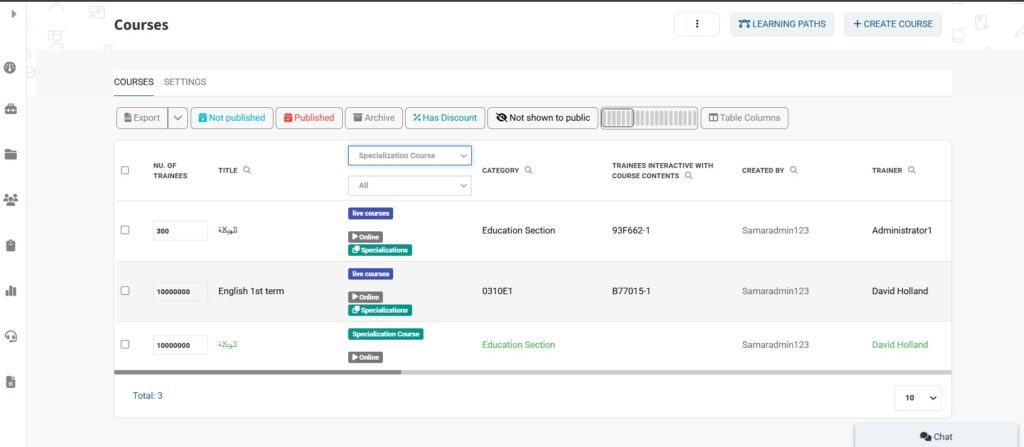
  • Ensure that administrators have created the course as a specialization type.
Accessing Specializations #
  1. Click the Specializations tab from the sidebar to open the Specializations table.
Creating a Specialization #
  1. Click the Create Specializations button.
  2. Make sure you have added the necessary Specialization Categories first.
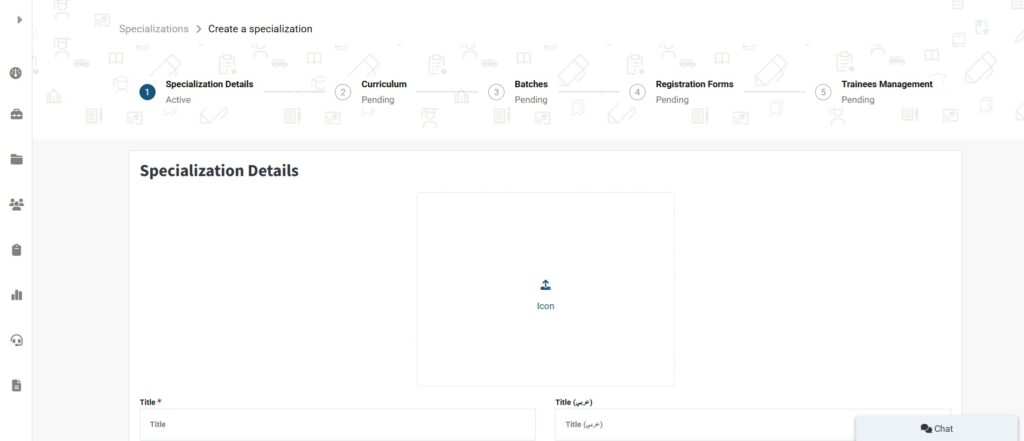
  1. In the Create Specializations form, enter the Specialization Title in both English and Arabic.
  2. Fill in the required details in both English and Arabic.
  3. Add Specializations Team & Rules if needed.
  4. You can review the Specializations Structure from this section.
  5. When finished, click Create to proceed to the next step.
Adding Curriculum Levels #

To add Curriculum Levels, continue to the next section.

Managing Curriculum, Batches, Registration Forms, and Trainees #
Curriculum #
  1. Add a title in both languages (e.g., English and Arabic).
  2. Specify the curriculum period and registration period.
  3. Set the required progress to pass (as a percentage).
  4. Click Create.
  5. Click the dropdown arrow next to the newly created curriculum.
  6. Click Add Course to add the desired courses to this curriculum (ensure the courses are of specialization type).
  7. When you finish adding courses, click on Next Step.
Batches #
  1. Click Create Batch. Add a title in both languages.
  2. Fill out the rest of the required fields. Click Create.
  3. Scroll down to select a trainer for this batch. Click
  4. Save Courses, then Next Step.
Registration Forms #
  1. Type the name for the submission button.
  2. Add a submission message.
  3. Click Create Form.
  4. Click the dropdown menu next to the newly created form.
  5. Click Form Editor to customize your form.
  6. Click Publish Now, then Next Step.
Trainee Management #
  • View the list of trainees who have filled out the form and submitted their application to this batch.
What are your Feelings

Share This Article :

  • Facebook
  • X
  • LinkedIn
  • Pinterest
Still stuck? How can we help?

How can we help?

Learning PathCoupons
Table of Contents
  • Prerequisites
  • Accessing Specializations
  • Creating a Specialization
  • Adding Curriculum Levels
  • Managing Curriculum, Batches, Registration Forms, and Trainees
    • Curriculum
    • Batches
    • Registration Forms
    • Trainee Management