
Aller au contenu
| User Manuals
| User Manuals

fr_FR French
fr_FR French en_US English ar Arabic

| User Manuals
| User Manuals

Administrator

  • Notification
  • New Landing Page
  • Auto-Enrollment
  • AI X-Sera
  • Modifier le profil
  • Se Connecter
  • Accueil
  • Personal Bar
  • Users Management
  • Corporates
  • Trainers
  • Trainees
  • Styles and Academy Settings
  • Managing Categories
  • Courses Settings
  • Cours £
  • Gérer le Contenu
  • Managing Sessions
  • Managing Assignments/Surveys
  • Creating/Adding Exam Questions
  • Comprehensive Progress Report
  • Competencies
  • Questions Bank
  • Certificate Templates
  • Learning Path
  • Specializations
  • Coupons
  • Packages
  • Annonces
  • Placement Exam
  • Course Statistics
  • Workflow
  • Setting up Workflows: Utilities
  • Enrollment Report
  • Technical Support

Trainees

  • Se Connecter
  • Accueil
  • Profil
  • Modifier le profil
  • Update Personal Information
  • My Learning
  • Annonces
  • La boîte aux lettres
  • Courses Settings
  • Course Content
  • Classes Intelligentes
  • Joining The classroom
  • Conversation en Classe £
  • Exams and Assignments
  • Certificates

Trainer

  • LOGGING IN
  • HOME PAGE
  • PERSONAL PROFILE
  • EDIT PROFILE
  • UPDATE PERSONAL INFORMATION
  • MAILBOX
  • Create Course
  • COURSE CONTENT
  • ONLINE SESSION
  • ADDING ONLINE SESSION USING ZOOM MEETING
  • ADDING ONLINE SESSION USING MS TEAMS
  • STARTING THE SESSION
  • JOINING THE SESSION
  • ZOOM CLASSROOM MAIN SCREEN
  • EXAMS
  • انشاء الواجب
  • ASSIGNMENT Settings
  • خيارات متقدمه
  • خيارات متقدمه
  • MANAGING EXAM QUESTIONS
  • CREATING QUESTIONS
  • ADD QUESTIONS FROM QBANKS
  • QUESTION BANK
  • COMPREHENSIVE PROGRESS REPORT
  • COMPETENCIES
  • FINANCIAL REPORT
  • Certificates

Corporate

  • Se Connecter
  • Trainees
  • Enrollment Report
View Categories
  • Home
  • Docs
  • Administrator
  • Personal Bar

Personal Bar

< 1 min read

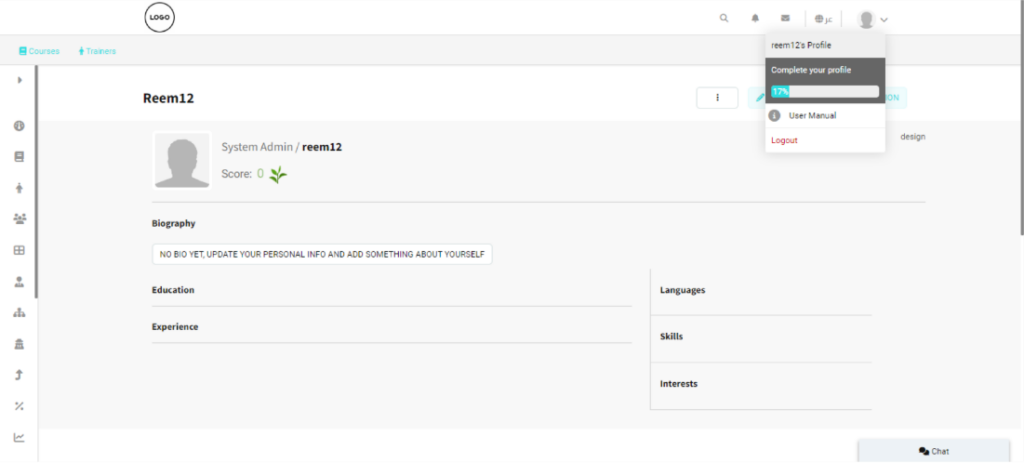
The Personal bar is a list of tabs containing all the user information to help you access and edit any of your data. Click the photo icon at the top right of your homepage to look deeper into your items.

Personal Bar Contents: #
  • User Profile: Provides access to your personal account information and settings.
  • Trainer Mode: Switches the interface to the trainer role, allowing access to trainer-specific features.
  • Trainee Mode: Switches the interface to the trainee role, enabling access to learner features.
  • دليل الاستخدام: يفتح دليل مستخدم الأكاديمية لتقديم الإرشادات والتعليمات الخاصة بالنظام.
  • User Manual: Opens the Academy User Manual for system guidance and instructions.
  • Log Out: Logs you out of your Classera Academy account securely.
What are your Feelings

Share This Article :

  • Facebook
  • X
  • LinkedIn
  • Pinterest
Still stuck? How can we help?

How can we help?

AccueilUsers Management
Table des Matières
  • Personal Bar Contents: