
Aller au contenu
| User Manuals
| User Manuals

fr_FR French
fr_FR French en_US English ar Arabic

| User Manuals
| User Manuals

Administrator

  • Notification
  • New Landing Page
  • Auto-Enrollment
  • AI X-Sera
  • Modifier le profil
  • Se Connecter
  • Accueil
  • Personal Bar
  • Users Management
  • Corporates
  • Trainers
  • Trainees
  • Styles and Academy Settings
  • Managing Categories
  • Courses Settings
  • Cours £
  • Gérer le Contenu
  • Managing Sessions
  • Managing Assignments/Surveys
  • Creating/Adding Exam Questions
  • Comprehensive Progress Report
  • Competencies
  • Questions Bank
  • Certificate Templates
  • Learning Path
  • Specializations
  • Coupons
  • Packages
  • Annonces
  • Placement Exam
  • Course Statistics
  • Workflow
  • Setting up Workflows: Utilities
  • Enrollment Report
  • Technical Support

Trainees

  • Se Connecter
  • Accueil
  • Profil
  • Modifier le profil
  • Update Personal Information
  • My Learning
  • Annonces
  • La boîte aux lettres
  • Courses Settings
  • Course Content
  • Classes Intelligentes
  • Joining The classroom
  • Conversation en Classe £
  • Exams and Assignments
  • Certificates

Trainer

  • LOGGING IN
  • HOME PAGE
  • PERSONAL PROFILE
  • EDIT PROFILE
  • UPDATE PERSONAL INFORMATION
  • MAILBOX
  • Create Course
  • COURSE CONTENT
  • ONLINE SESSION
  • ADDING ONLINE SESSION USING ZOOM MEETING
  • ADDING ONLINE SESSION USING MS TEAMS
  • STARTING THE SESSION
  • JOINING THE SESSION
  • ZOOM CLASSROOM MAIN SCREEN
  • EXAMS
  • انشاء الواجب
  • ASSIGNMENT Settings
  • خيارات متقدمه
  • خيارات متقدمه
  • MANAGING EXAM QUESTIONS
  • CREATING QUESTIONS
  • ADD QUESTIONS FROM QBANKS
  • QUESTION BANK
  • COMPREHENSIVE PROGRESS REPORT
  • COMPETENCIES
  • FINANCIAL REPORT
  • Certificates

Corporate

  • Se Connecter
  • Trainees
  • Enrollment Report
View Categories
  • Home
  • Docs
  • Administrator
  • New Landing Page

New Landing Page

< 1 min read

The new landing page is designed in the optimum user-friendly way possible. It provides intuitive navigation and customizable sections, allowing you to easily modify, reorder, or hide components to fit your academy’s specific needs. With a clean layout and clear structure, users can quickly access key information and resources, delivering a seamless, engaging experience from the very first visit.
Additionally, the flexible design lets you showcase your content and announcements prominently, ensuring the landing page always aligns with your brand identity and goals.
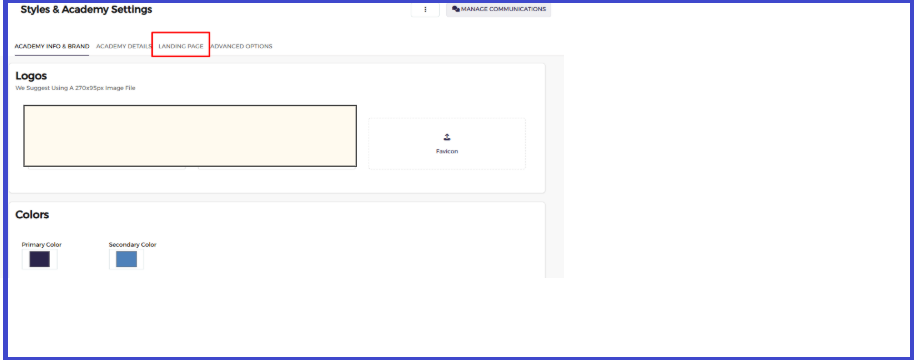
Through the Styles & Academy Settings, you can build a custom Landing Page tailored to your client’s brand identity.
This feature allows you to:

  • Show or hide homepage sections according to the client’s branding requirements.
  • Reorder sections to match the preferred user journey and navigation flow.
  • Add new custom sections with unique layouts and designs to support additional content or special announcements.

This ensures your academy’s homepage always aligns with the client’s visual identity and delivers a more personalized and engaging user

What are your Feelings

Share This Article :

  • Facebook
  • X
  • LinkedIn
  • Pinterest
Still stuck? How can we help?

How can we help?

NotificationAuto-Enrollment